
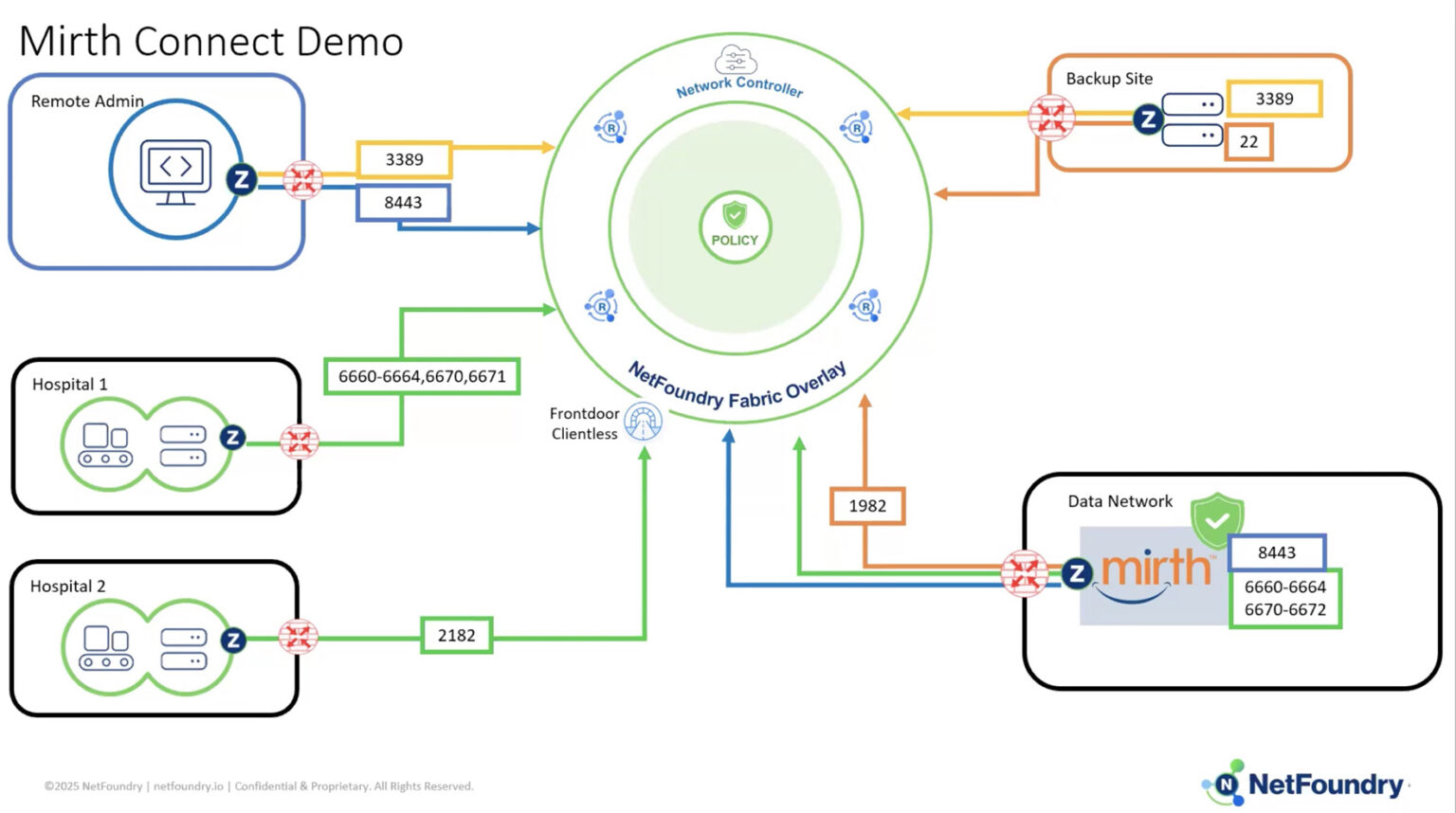
In this demonstration, Jerome Mills, a sales engineer at Net Foundry, showcases the company’s Zero Trust software within a healthcare context. He highlights the flaws of traditional VPN setups, noting that they often require weeks to deploy, create exposure points through open ports, and introduce risks like lateral movement and brute-force attacks. In contrast, Net Foundry’s solution secures networks by requiring clients to connect outbound via port 443—bypassing the need for firewall configuration changes—and mandates authorization via an X509 certificate prior to establishing any connection.
During the demo, Mills successfully tests an RDP connection to a backup site, demonstrating file offloading and the secure processing of HL7 messages. He also verifies that the Mirth administrator application listens solely on the localhost, ensuring traffic does not enter the local network. To conclude, Mills illustrates the software’s continuous authorization capability by instantly terminating his active RDP session simply by removing his access attribute in the user interface, before noting the platform’s API readiness for CI/CD automation and its flexible deployment options across cloud environments and home data centers.
Three Key Takeaways:
- Simplified Deployment and Scalability: Unlike traditional VPNs that can take weeks to configure, Net Foundry uses outbound connections (port 443) to eliminate firewall modifications, offers API accessibility for seamless CI/CD automation, and provides versatile deployment options including host configurations and virtual machines.
- Security Through Identity-First Authorization: Net Foundry’s solution mitigates the risk of brute-force attacks and lateral movement by requiring users to authenticate via an X509 certificate before a connection is ever established, completely avoiding the open ports and TCP-first connections used by traditional applications.
- Continuous and Dynamic Authorization: Access permissions are monitored constantly; the demo proved this by showing an active RDP session immediately disconnecting the moment the user’s access attribute was revoked in the administrative UI.
Frequently Asked Questions
1. What are the main security risks of traditional VPNs in healthcare networks?
Traditional VPN setups present several critical challenges for healthcare organizations managing sensitive data:
- Prolonged Deployment: Coordinating with third parties to configure and validate VPNs can take weeks, delaying essential connectivity.
- Lateral Movement Risks: Once a VPN is established, a compromised network can act as an exploit vector, allowing attackers to move laterally across connected hospital systems.
- Exposed Attack Surfaces: Legacy applications establish a TCP connection before authorizing the client, leaving open ports vulnerable to brute-force attacks and network scanning.
- Unmanageable Complexity: Relying on a patchwork of advanced firewall rules and ACLs becomes difficult to maintain over time, often resulting in accidentally exposed applications.
2. How does NetFoundry’s zero-trust software secure sensitive healthcare applications?
NetFoundry flips the traditional security model by ensuring continuous, identity-based authorization:
- Outbound-Only Connections: All clients connect outbound via port 443, eliminating the need to open inbound firewall ports.
- Authenticate-First Architecture: Clients must authorize against the control panel using an X509 identity certificate before any connection is established.
- Continuous Authorization: Access is constantly verified. If access attributes are revoked in the system, active sessions (such as an RDP connection) are instantly disconnected.
- Network Obfuscation: The platform uses non-routable, intercepted addresses rather than fully qualified domain names, keeping destination addresses completely hidden from the public internet.
3. How does deploying NetFoundry compare to traditional network infrastructure?
Because NetFoundry is entirely software-driven, it eliminates the hardware bottlenecks and deployment delays associated with traditional setups.
| Feature | Traditional Infrastructure | NetFoundry Zero-Trust |
| Setup Time | Weeks of back-and-forth configurations. | Instant, API-driven automated deployments. |
| Firewall Changes | Requires complex inbound port management. | Zero inbound changes; utilizes outbound port 443. |
| Deployment Options | Reliant on physical hardware and site-to-site tunnels. | Flexible deployment via local host configurations, VMs in any major cloud, or on-premises data centers. |
| Scalability | Manual updates required for scaling and ACL management. | API-first design integrates seamlessly with existing CI/CD platforms for automated scaling. |
Full Transcript
Hi, my name’s Jerome Mills, I’m a sales engineer here at NetFoundry, and today I’ll be going over a healthcare demo using our zero trust software.
In this example of a traditional setup, we’ve got a couple hospitals here on the left-hand side, a remote administrator down at the bottom, all connecting to a centralized data server. That data server, after processing the data, offloads it to a backup location.
The first challenge here is the time that it will take for those VPNs to get stood up. You’ve got third-party timelines, back-and-forth configurations, and validations that can sometimes take weeks. Once everything is stood up, it now becomes a potential exploit vector throughout all of the networks as there’s now the availability for lateral movement. Having open ports means having another exposure point. Applications will create a TCP connection first, and then they’ll authorize the client. This is an exposure for brute force attacks and the like.
You can mitigate some of this using advanced firewall rules, ACLs, and all those different configurations can become unmanageable over time, and you can eventually, potentially have exposed applications on the internet that shouldn’t be.
With a NetFoundry solution, all clients connect outbound via port 443. So there’s no need for any configuration changes on the firewall, everything is secure. Clients authorize first to the control panel using their identity, an X509 certificate, and then they’re allowed to connect.
In this example, I’ll be doing an RDP connection to our backup site to show that the files are getting offloaded, as well as HL7 messages getting processed and sent to a Slack channel. I’ll also log into the Mirth administrator application to show that the channels are indeed listening only on the localhost, and afterwards, I’ll log into our GUI, remove the attribute that allows the RDP connection, and we’ll see how quickly it removes.
Here we have the RDP connection. The first thing I’d like to point out is that mirth.rdp is not a fully qualified domain name, it’s not a routable address. These intercepts fully obfuscate the destination address, adding another layer of security. I’m going to go ahead and start the simulator here, and in a few seconds, we’ll see some HL7 messages getting processed, the PDF file gets uploaded, and then we start to see that MRI file getting uploaded. That takes a little bit of time as it’s a pretty big file.
Here in the Mirth admin panel, if I go down into the channels and select one, we see here in the source that it is only listening on the localhost. This further locks down the application so the traffic isn’t even going into the local network.
Now, I’ll go ahead and come in here into our UI and the identities, filter for mine, we see here these attributes that are allowing me access to the various services. I’ll go ahead and remove the RDP attribute, select update, and here in the background we’ll see in a few seconds that this RDP connection will disconnect. This is because authorization is ongoing and continuous, and when there’s that change, here we see that disconnection.
With traditional setups, they take a lot of time, there’s a lot of deployment issues that can happen. Setting up with us is a breeze because everything is an outbound connection. Everything that we have in the UI is available via an API so it can be automated at scale, so it can automatically integrate into your CI and CD platforms. Because we’re a software company, everything that we have has multiple deployment options. You just saw the host configuration that allows for that localhost connection, but we also have a virtual machine that can be deployed in any of the popular clouds as well as in your own data center.
Thank you very much for your time.