
In this 8-minute demonstration, Sales Engineer Flavio Carrasco presents NetFoundry’s identity-first, site-to-site (S2S) connectivity platform. He outlines common challenges with traditional VPN deployments—such as overlapping IPs, vendor interoperability, complex firewall rule management, and the security risks of opening inbound ports.
The demo showcases how administrators can easily spin up a virtual edge router and share a registration key, allowing a partner or customer to connect securely via their existing hardware using a single command. Once authenticated, administrators can instantly grant or revoke granular, least privileged access to remote services (like those hosted on Azure and AWS) entirely through a centralized portal, while also monitoring network telemetry and continuous posture compliance.
Key Takeaways
- Rapid and Simplified Deployment: Administrators can establish secure connectivity in minutes rather than weeks by simply sharing an auto-generated registration key that deploys a container on the customer’s hardware.
- Granular Control and Enhanced Security: Access is managed dynamically through a centralized portal via one-click assignments, enforcing least privilege access and continuous posture checks without opening any inbound firewall ports (only outbound port 443 is required).
- Elimination of Complex Configurations: The platform inherently handles complex networking burdens, actively supporting overlapping IP ranges without route advertisement configurations and automatically rotating certificates to reduce ongoing operational overhead.
Frequently Asked Questions
1. What are the common challenges associated with traditional site-to-site VPNs?
Traditional site-to-site VPN deployments often suffer from several complex operational and security hurdles:
- Expanded Attack Surface: They require opening inbound firewall ports, leaving the network vulnerable to scanning and exploitation by bad actors.
- Interoperability Issues: Mismatched parameters and varying interpretations of IPsec standards between different vendors frequently prevent tunnel establishment.
- Routing Conflicts: Overlapping IP ranges between two distinct sites can cause traffic routing failures, leading to connectivity loss.
- Administrative Overhead: Managing an ever-growing list of firewall rules for each new site creates constant change management headaches.
2. How does NetFoundry secure site-to-site connectivity without opening inbound ports?
NetFoundry utilizes an identity-first, zero-trust approach that entirely eliminates the need for open inbound firewall ports.
- Outbound-Only Connections: The edge router only requires outbound internet access over standard port 443.
- Secure Registration: Connecting a new site is as simple as running a single command with a securely generated registration key.
- Default Deny Posture: Even after a router is connected and authenticated, it has zero access to network services until specific privileges are explicitly granted by an administrator.
- Continuous Posture Enforcement: Access is continuously verified. If an administrator revokes access, the connection is instantly terminated with no risk of lateral movement.
3. How does NetFoundry’s deployment compare to traditional IPsec VPNs?
NetFoundry simplifies and accelerates site-to-site connectivity while improving security posture:
| Feature | Traditional IPsec VPN | NetFoundry Site-to-Site |
| Deployment Time | Often takes days or weeks to configure and troubleshoot. | Deploys in minutes via container on existing COTS hardware. |
| Firewall Configuration | Requires complex inbound port management and routing rules. | Zero inbound changes; only requires outbound port 443. |
| IP Overlaps | Requires complex NAT configurations and advertised routes. | Natively supports overlapping IP ranges without routing conflicts. |
| Certificate Management | Manual tracking and updating to avoid expirations. | Fully automated certificate rotation, eliminating operational burden. |
Full Transcript
Hello everyone, Flavio Carrasco, sales engineer with NetFoundry. Today I’ll be showing you a demo on NetFoundry’s identity-first site-to-site connectivity.
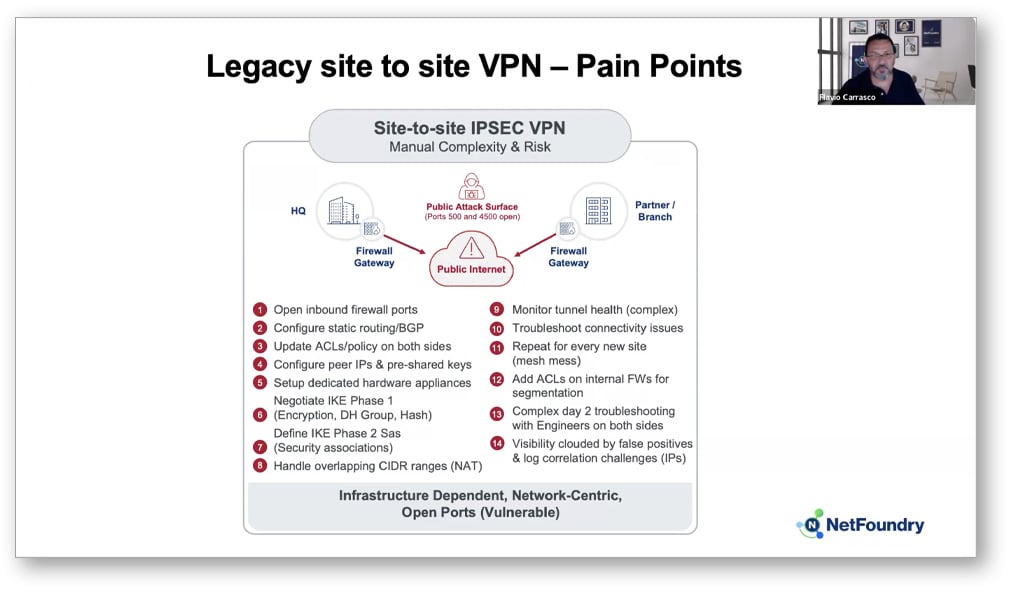
The most common pain points for site-to-site VPNs stems from challenges like opening inbound firewall ports which increases your attack surface for bad actors to exploit. You have mismatched parameters between two endpoints preventing tunnel establishment, and then you have interoperability between vendors for IPsec standards are interpreted slightly different. And then you go about having issues with overlapping IP ranges between two sites where traffic cannot be routed correctly leading to connectivity loss. Then you know, last but not least, you have change management headaches around the ever-growing list of firewall rules for every new site you have to deploy. You know, and this list could go on and on and on, right?
Imagine you’re running critical services across Azure and AWS. In this case, I have a web service in Azure and a Windows server in AWS. You need to give a partner or customer access to those services from their on-prem data center, and usually, this is where the configuration headache begins.
But what if it is as simple as this: You spin up a router in your portal and share the secure key. Your partner or customer drops a container onto their existing COTS hardware and runs one command. The router auto-registers and you’re connected. From that moment on, you have total control to manage granular access with a single click or a simple API call.
Well, that’s exactly what I’m going to demonstrate on how significantly simple this can be with our NetFoundry platform. And the best part about it is that you don’t have to open any firewall ports and all you need is outbound internet access on port 443 as just like the arrows designate here.
So when you log in to your portal as an enterprise administrator, the first thing you need to do is create an edge router so your customer could deploy the router on their on-premise, right? So what you do is hit plus, you create your router name, it’s going to be customer hosted, create, and it will generate the registration key. So now you need to share that with your customer. So on the top right you hit share, you enter their email address and once you share they get notified. So in this case I’m just going to hit copy, and this is what the customer is going to experience.
When they deploy the VM on one of their COTS hardware on their on-prem, all you have to do is execute pseudo router registration, the key you provided them, and then you can kind of start seeing the initialization process. It’s downloading the binary, it’s installing the binary, and then here in a second it would be, it’s going to show successfully registered or installed. Here you go. It’s registration is successful.
Now the administrator, the enterprise admin sees that their on-prem router has been successfully installed and registered to the network. But just because it’s connected and authenticated does not mean that they now have access to all the services you have created in this portal, right? So what now you need to do is assign those privileges to them. So you would select identities, go to the identity that you just created which is your NetFoundry site-to-site demo, and in this case I’m just going to allow AWS and the Azure services, right? So once it’s updated, it’ll take a few seconds to initially to kind of push the services to the router to be allowed.
I’ll go to my RDP console, and in this case I’m going to go to AWS site-to-site. You can kind of see that I’m connecting pretty quickly from when I allowed the service to signing in now to access it. You can kind of see that it’s logging in to my AWS Windows server. Now I’ll just go to a new tab and go to my Azure web service, and you could now see that I was able to access both services in Azure and in AWS.
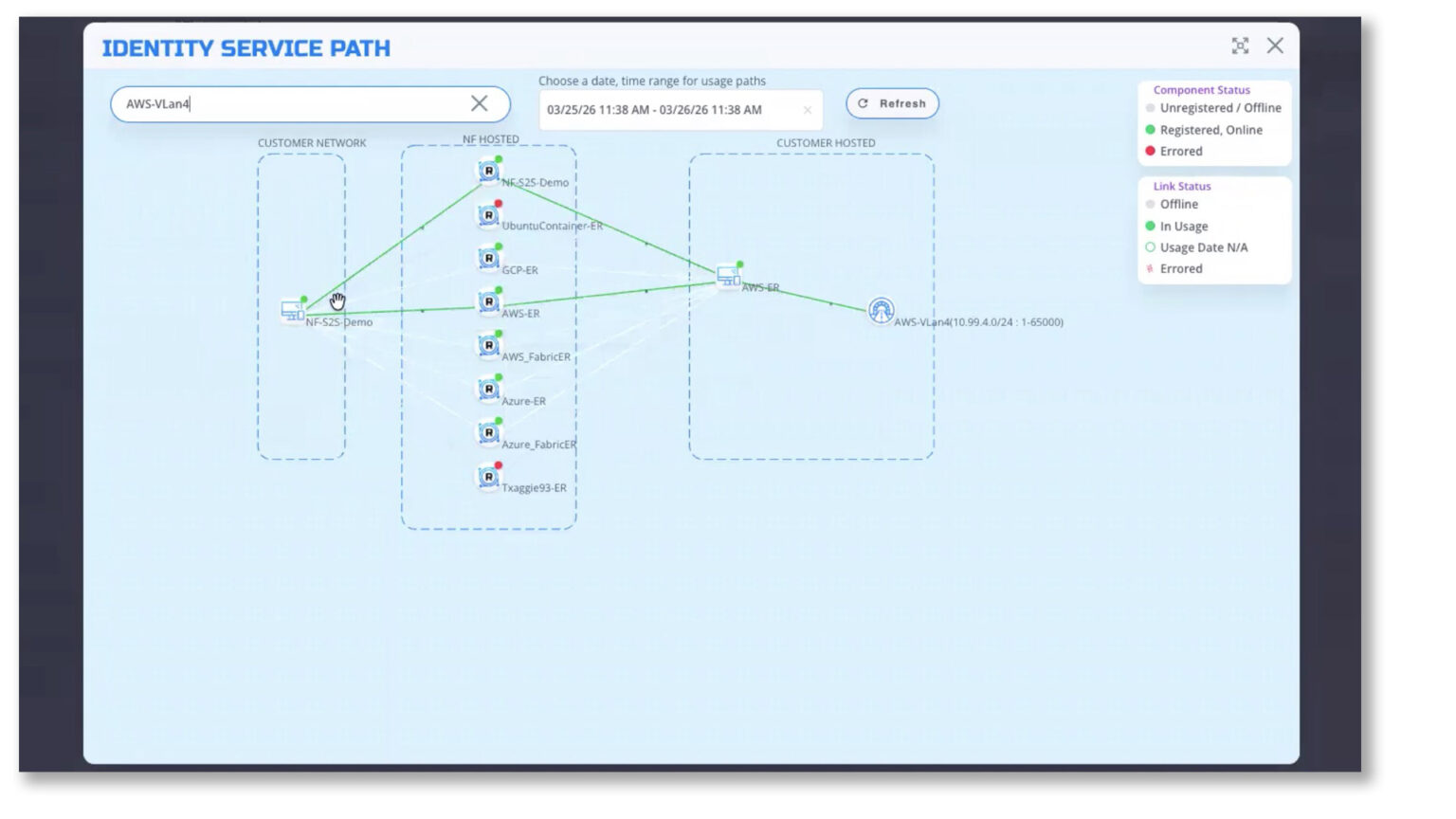
And if you want to kind of see some metrics, I could go to that identity, I could go to my visualizer. So I could go to my AWS. As now you could kind of see the connectivity routes between the edge router you created to the NetFoundry hosted fabric to your customer to the endpoint which is AWS router, the AWS edge router to the Windows server here.
Now, if I wanted to remove access for the services I just assigned a second ago, just go back to the identity, I’ll just remove them, update, and you could kind of see that it instantaneously removed the service from that individual. So we do a constant posture check. This endpoint was out of compliance because we were no longer allowing the service to AWS and it was immediately, the connection was immediately disconnected.
As you saw on this demo, we were able to deploy in minutes and not have to wait for days or weeks for deployment. You had, you know, access to host services are easily assigned and removed with least privilege access and continuous posture enforcement. No open ports were required on the firewall, only 443 outbound, you know, reducing your attack surface for bad actors from exploiting open ports and no chance of lateral movement. You had, you know, we do support the overlapping IP ranges without needing to configure or advertise routes, reducing the risk for unnecessary outages. And you don’t have to worry about certificate expirations because we provide automatic certificate rotations for you, eliminating any operational burden. And then you could, you had deep visibility for auditing and troubleshooting within the console itself. And then last but not least, the optimized performance by NetFoundry fabric’s smart routing features that you have access to.
With that said, you know, this is it for the demo. I appreciate your time and thank you, and stay tuned for additional recordings.