
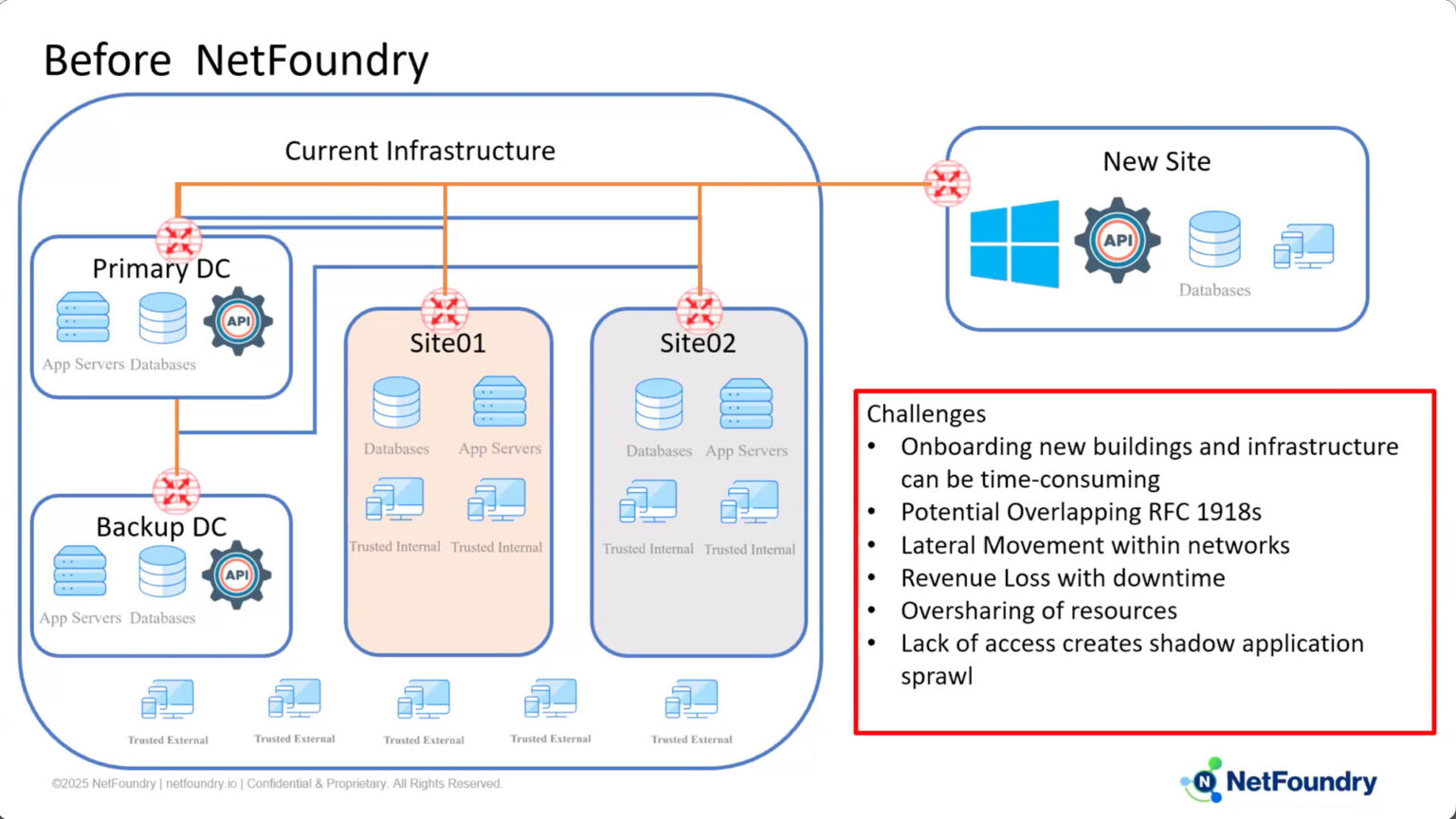
In this demonstration, Jerome Mills from NetFoundry highlights how our identity-first Zero Trust platform resolves common networking challenges during mergers and acquisitions. Traditional VPNs take too long to deploy, demand heavy maintenance, and introduce severe security risks—like lateral movement—if a network segment is compromised.
NetFoundry’s platform bypasses these issues by routing all connections outbound over port 443, which entirely removes the need to alter firewall configurations. Access is tightly managed through continuous X.509 certificate authentication and policy attributes, ensuring identities only access what they are explicitly permitted to see. To prove this functionality, Jerome successfully bridges an AWS application server and a GCP database despite overlapping IP addresses. He then verifies the platform’s immediate security responsiveness by revoking an edge router’s access attribute, instantly blocking the server from transmitting data.
Key Takeaways
- Firewall Configurations Are Eliminated: NetFoundry’s solution simplifies network deployment by strictly using outbound connections via port 443, removing the need for manual firewall changes or extensive setup.
- Access is Granular and Continuous: Possessing an identity does not guarantee access; connectivity is dictated by specific policy attributes that, when revoked, immediately sever the connection to prevent unauthorized lateral movement.
- Seamless Cross-Cloud Integration: The platform can easily and securely connect application layers across entirely different cloud environments (such as AWS and GCP), even when those environments have conflicting, overlapping IP addresses.
Frequently Asked Questions
Do I need to reconfigure my firewalls to use NetFoundry during an M&A integration? No, all connections within NetFoundry’s Zero Trust solution are established outbound via port 443. This approach entirely eliminates the need to make any firewall changes or add complex network configurations.
How does the platform prevent lateral movement and unauthorized access? Traditional site-to-site VPNs can expose your infrastructure to lateral movement if a newly connected site hasn’t been properly vetted and harbors an infected client. NetFoundry mitigates this risk by ensuring that simply possessing an identity does not grant network access. Identities must authenticate using an X.509 certificate before connecting, and access is strictly defined by policy attributes. Because authentication is ongoing, removing an attribute immediately revokes connectivity for that service.
Will overlapping IP addresses between the two merging companies cause connectivity issues? Not at all. Overlapping IP addresses do not matter when using this identity-first platform. In the demonstration, an application server in AWS West seamlessly connects to a Cloud SQL database in GCP US Central 1, even though both sides share overlapping IP addresses on the 10.128.2.15 subnet.
Full Transcript
Hi, my name is Jerome Mills. I’m a sales engineer here at NetFoundry. Today I’ll be going over a mergers and acquisitions demo using our identity-first Zero Trust platform.
Before NetFoundry, here is an example of a traditional new site getting added on using a VPN. Some of the challenges are the time it takes that VPN to initially get stood up. Onboarding those new buildings and infrastructure can be very time-consuming. Then you have the ongoing maintenance and multiple touch points of NATs, ACLs, BGPs, load balancers, VLANs, VRFs; it slows down time to business and innovation. In the event of oversharing, certain teams will get access to things they don’t need, thereby causing a potential security breach. If that new site isn’t properly vetted, there could be an infected client on that side, and that can in turn now make lateral movements into all of your other infrastructure. Under-sharing of resources causes shadow IT within the organization, making things hard to manage and hard to track. With NetFoundry’s Zero Trust solution, all connections are done outbound via port 443. There’s no need to make any changes on the firewall or no additional configurations needed. Identities connect using an X.509 certificate and they authenticate before they make the connection to the controller or the NetFoundry fabric.
Just because you have an identity does not mean you have access to anything on either side of any connection. Connectivity is defined through policies, and attributes are given to identities to give them access. Because that authentication is ongoing, removing those specific attributes immediately removes the service from connectivity. In this specific example, we’ve got multiple edge routers, but we can go closer to the point of data at the client using a Windows, Mac, mobile device platform for our connectivity, as well as further down with an SDK in your favorite languages so that the entire application itself is not visible on any part of the network. In this example here, I’ll be connecting to an application server on AWS West to a Cloud SQL in GCP on US Central 1.
Something to note that both sides have overlapping IP addresses on the 10.128.2.15. I’ll show that that doesn’t really matter. And then by removing the attribute from the edge router here, we’ll see that connectivity is no longer allowed from the app server behind it. Right here on the left, you’ll see my Cloud SQL. Notice I have some orders here. The most recent order is 10426. Here on the right hand side, we have my application server. You’ll note that when I ran the update, the repo locations are located in EC2, showing that this is in fact in AWS. I’m going to go ahead and run a script that will allow me to insert some data. You’ll notice here I inserted 10427, and a comment is ‘added from AWS’.
Go ahead and click run, and we see 10427 added from AWS as the comment. Now if I hop in here, this is the edge router that is connected in the AWS instance, and you’ll notice it has the SQL demo attribute. I’m going to go ahead and remove that attribute, update that specific edge router, and then in a few moments, I’ll go ahead and try to insert the data again, and it should get blocked and time out. And there we see that I’m no longer allowed to access because I’ve removed the attribute here from the edge router.
To go over it again, with a site-to-site VPN that allows lateral movement, configuration and ongoing maintenance adds a bunch of complexity and reduces visibility because of things like NAT. With ours, everything is outbound via port 443, so there’s no need to make any firewall changes. All actions are monitored at the identity level to see which identity accessed what and how much data they gathered. Thank you very much for your time.
If you’d like some more information, feel free to reach out.