Add and remove firewall rules
Use this page to add and remove firewall rules in the NetFoundry zLAN console.
Firewall rule fields
Each rule consists of the following fields:
-
Type:
- Custom (requires Protocol selection)
- HTTP
- HTTPS
- LDAP
- RDP
- SSH
-
Protocol:
- Only shown for Custom type
- TCP or UDP
-
Direction:
- INBOUND (traffic coming into the firewall)
- OUTBOUND (traffic leaving the firewall)
-
Action:
- Allow (permit traffic)
- Deny (block traffic)
-
Source:
- IP address or CIDR range (e.g.,
192.168.1.0/24)
- IP address or CIDR range (e.g.,
-
Destination:
- IP address or CIDR range (e.g.,
10.0.2.5) - Domain name (e.g.,
sheets.google.com) - Wildcard domain:
*.<domain>(e.g.,*.google.com)
- IP address or CIDR range (e.g.,
-
Port Range:
- Specify a range (e.g.,
80-443for HTTP/HTTPS) - For single ports, use the same value for low and high (e.g.,
22-22for SSH)
- Specify a range (e.g.,
A wildcard destination must start with *. followed by a domain name. A bare * isn't supported. The firewall
doesn't apply a rule with a malformed wildcard, such as *google.com, and raises an alert instead.
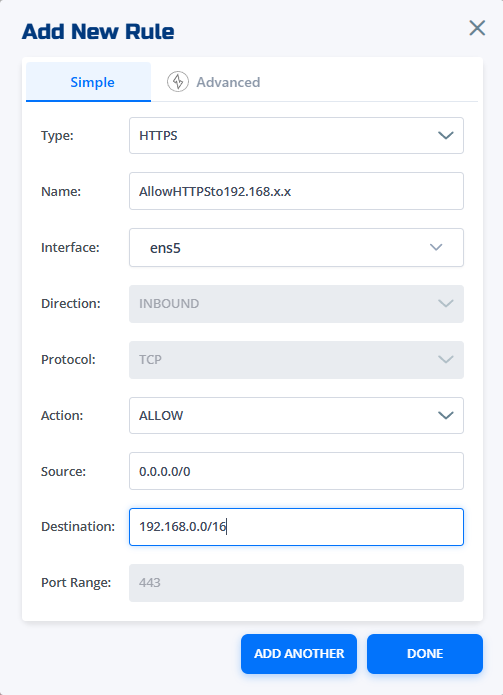
Add a rule
- Click Add Rule in the console.
- Select the Type (e.g., HTTP, SSH, Custom).
- If you select Custom, choose the Protocol (TCP or UDP).
- Choose the Direction (INBOUND or OUTBOUND).
- Set the Action (Allow or Deny).
- Enter the Source IP/CIDR.
- Enter the Destination as an IP address, CIDR range, domain name, or wildcard domain.
- Specify the Port Range (low-high).
- Click Save to apply the rule.
Changes do not take effect until you click Save.
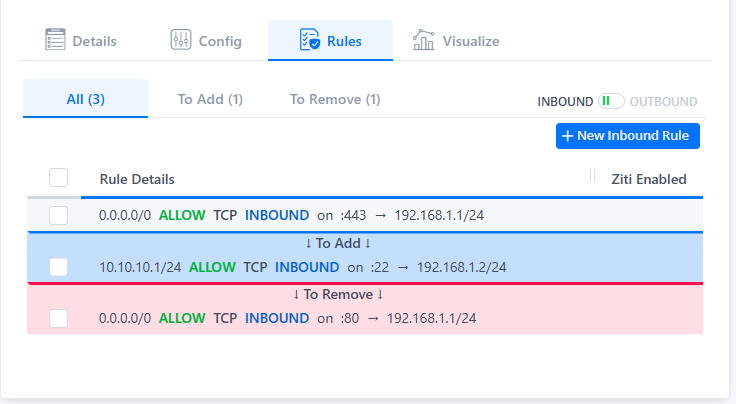
Remove a rule
- Locate the rule you want to remove in the rules list.
- Click the Delete (trash) icon next to the rule.
- Confirm the deletion when prompted.
- Click Save to apply the change.
Removing a rule does not take effect until you click Save.

Example rules
-
Allow inbound HTTP from any source to 10.0.2.5 on port 80:
- Type: HTTP
- Direction: INBOUND
- Action: Allow
- Source: 0.0.0.0/0
- Destination: 10.0.2.5
- Port Range: 80-80
-
Deny outbound SSH from 192.168.1.100 to any destination:
- Type: SSH
- Direction: OUTBOUND
- Action: Deny
- Source: 192.168.1.100
- Destination: 0.0.0.0/0
- Port Range: 22-22
-
Allow inbound Custom TCP from any source to 10.0.2.5 on port range 1000-2000:
- Type: Custom
- Protocol: TCP
- Direction: INBOUND
- Action: Allow
- Source: 0.0.0.0/0
- Destination: 10.0.2.5
- Port Range: 1000-2000
-
Allow outbound HTTPS from any source to any subdomain of
google.com:- Type: HTTPS
- Direction: OUTBOUND
- Action: Allow
- Source: 0.0.0.0/0
- Destination:
*.google.com - Port Range: 443-443