One Time Tokens
Enrolling an identity with a "one time token" is possibly the most common form of adding an identity to a tunneler. This token is the original form supported by OpenZiti. It entails an operator provisioning an identity for a user. This process results in a single use (one-time) token that can be used to generated an OpenZiti identity, allowing the process to be trusted by the OpenZiti overlay network.
Prerequisites
- An identity has been created and the one-time use JWT captured. If needed, follow this guide to create an identity and one-time token. Once created, transfer the JWT file to the Windows machine you want to enroll.
Adding the Identity
Go to the Ziti Desktop Edge for Windows and click ADD IDENTITY in the top right of the UI.
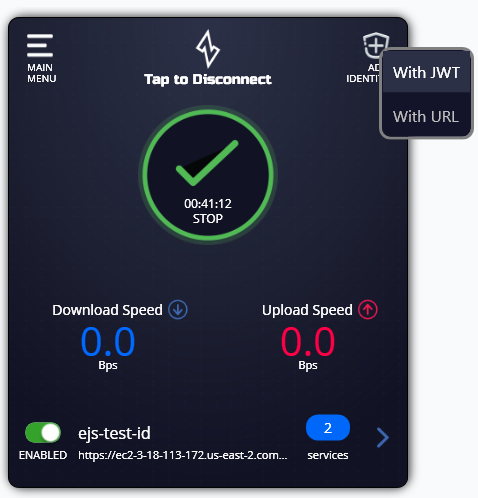
After the context menu pops up, choose "With JWT". Select the JWT file and your identity will be enrolled. You can now selectively enable/disable the service and see how many individual services your identity has access to.