Create a certificate request token
Certificate request tokens provide a secure workflow for issuing client certificates for your Frontdoor service. This process allows an administrator to first create a single-use token containing pre-approved metadata. An end user or system then redeems this token along with their own certificate signing request (CSR) to generate the final client certificate, securely separating the administrative approval from the end user's key generation.
Steps
- Frontdoor console
- Command-line interface
-
From the Frontdoor console, click Certificates in the left-hand menu.
-
Click the Certificate Request Tokens tab.
-
Click the + icon to create a new certificate request token.
-
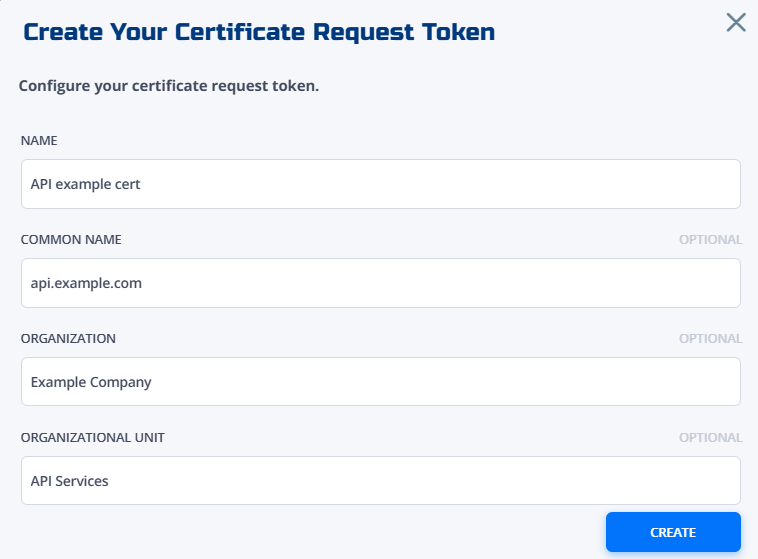
Fill in the fields:
- Name: A name for the token used in the Frontdoor console (e.g., `API example cert), and the name of the client certificate created when the token is used.
- Common name (Optional): The common name (CN) for the certificate (e.g.,
api.example.com). - Organization (Optional): The organization (O) for the certificate (e.g.,
Example Company). - Organizational unit (Optional): The organizational unit (OU) within the organization for the certificate (e.g.,
API Services).
The optional fields are used to pre-define and lock parts of the certificate's subject. The end user redeeming the token can't modify these fields when creating the certificate, unless they're left blank.
-
Click Create.
Your certificate request token will appear in the token list.
-
Open the token and copy its Share link, or download its Enrollment JWT.
Send one of these to the person or system that needs the certificate. Both carry the signed enrollment JWT, which holds the endpoint to call, the token, and the certificate subject you fixed. The share link opens a page that generates a key pair in the recipient's browser; the downloaded JWT suits a recipient who automates the request.
Treat either one as a credential and send it over a channel you trust. To revoke it, delete the token.
-
Create a token with certificate metadata.
To create the token, send a
POSTrequest to the/certificate-request-tokensendpoint with the pre-approved certificate metadata in the JSON body:curl -X POST \-H "Authorization: Bearer $TOKEN" \-H "Content-Type: application/json" \-d '{"name": "api-service-cert","commonName": "api.example.com","organization": "Example Corp","organizationalUnit": "API Services","validYears": 1}' \"https://gateway.production.netfoundry.io/frontdoor/v2/$FRONTDOOR_ID/certificate-request-tokens"The response includes the token's ID:
{"id": "e89b12d3a4564000","name": "api-service-cert","token": "k7m2xq9v4t","commonName": "api.example.com","organization": "Example Corp","organizationalUnit": "API Services","expiresAt": "2026-12-31T23:59:59Z"} -
Retrieve the enrollment JWT.
curl -H "Authorization: Bearer $TOKEN" \"https://gateway.production.netfoundry.io/frontdoor/v2/$FRONTDOOR_ID/certificate-request-tokens/e89b12d3a4564000/enrollment-jwt"{"frontdoorId": "9f2c41e8-7b3a-4d15-a0c6-2e8f1b47d903","certificateRequestTokenId": "e89b12d3a4564000","jwt": "eyJhbGciOiJFUzI1NiIsImtpZCI6ImEzZjkxYzQ3In0.eyJpc3MiOiJmcm9udGRvb3IiLCJhdWQiOiI5ZjJjNDFlOC03YjNhLTRkMTUt...","url": "https://gateway.production.netfoundry.io/frontdoor/v2/9f2c41e8-7b3a-4d15-a0c6-2e8f1b47d903/client-certificates/enroll","expiresAt": "2026-12-31T23:59:59Z"} -
Securely share the
jwtvalue with the system or user who needs the certificate.The JWT carries the endpoint, the token, and the certificate subject, so this is the only thing the recipient needs. Treat it as a credential. To revoke it, delete the token.
-
Redeem the JWT.
The recipient builds a CSR whose subject matches the fields the token fixed, then posts it with the JWT. The endpoint is the
urlclaim inside the JWT, so the recipient does not construct it:openssl req -new -newkey rsa:2048 -nodes -keyout client.key -out client.csr \-subj "/CN=api.example.com/O=Example Corp/OU=API Services"curl -X POST \-H "Content-Type: application/json" \-d "$(jq -n --rawfile c client.csr --arg j "$ENROLLMENT_JWT" '{jwt: $j, csr: $c}')" \"https://gateway.production.netfoundry.io/frontdoor/v2/$FRONTDOOR_ID/client-certificates/enroll"A CSR whose subject disagrees with the token is rejected with a
400naming each mismatched attribute.To check a request without sending it for real, add the
nf-validateheader. The response lists the same violations, creates nothing, and leaves the enrollment JWT usable:curl -X POST \-H "Content-Type: application/json" \-H "nf-validate: true" \-d "$(jq -n --rawfile c client.csr --arg j "$ENROLLMENT_JWT" '{jwt: $j, csr: $c}')" \"https://gateway.production.netfoundry.io/frontdoor/v2/$FRONTDOOR_ID/client-certificates/enroll" -
Verify certificate creation.
The client certificate is created with the metadata from the token and can be used for authentication.
Troubleshooting
Token not found or expired
When encountering token validation issues:
- Verify the enrollment JWT was copied whole, with no line breaks introduced by the channel it travelled through
- Check that the expiration time hasn't passed (tokens automatically become invalid after their configured lifetime)
- Confirm the token hasn't already been used to create a certificate (tokens are single-use by design)
- Verify that the token hasn't been deleted from the system by an administrator
- Confirm the JWT was issued for the Frontdoor account being called; a JWT is valid for one account only
Certificate signing request subject rejected
A 400 response naming an attribute means the CSR subject disagrees with the token:
- Read the error. It names each attribute, the value the token requires, and the value the request sent
- Rebuild the CSR with a matching
-subj, for example-subj "/CN=api.example.com/O=Example Corp/OU=API Services" - The required values are also in the enrollment JWT, so decoding it shows what the CSR must contain
- An attribute the administrator left blank places no constraint, and the request chooses it
Permission errors
Permission-related issues typically stem from insufficient access rights or configuration problems:
- Confirm that the user attempting to create tokens has the appropriate permissions within the Frontdoor account
- Verify that token redemption is being performed correctly according to the API documentation and expected workflow
- Check that TCP shares are enabled for the Frontdoor account (required for certificate-based authentication functionality)